


Showing posts with label FTU Tutorials. Show all posts
Showing posts with label FTU Tutorials. Show all posts
Monday, 4 March 2013

Tutorial written on 4th March 2013
This tutorial assumes you have working knowledge of
Adobe Photoshop CS2 and adobe image ready
♥ Supplies Needed ♥
♥ Scrap Kit of Choice I Used FTU Scrap Kit HERE
♥ You Need SATC License number to use this Art
♥ Font of Choice I used Corinthia
♥ Plugin Needed VanDerLee > Light
♥ Mask of choice
Open new image (ctrl+n) 700x600 px with white bg color
Open CloverFrame 05 (resize 90x90%) > Edit > Transform > Rotate 90 ccw
Now Open Paper 4, Paste it behind Frame layer and erase the part of paper Sticking out
Open Tube layer 3 Paste it behind Frame layer erase the part of tube sticking out
Now Merge Down (Ctrl+E) tube with Bg paper
Open Filter VanDerLee> Light (color =#75f481)
x position 57
y position 50
Angle 208
focus 42
Open Tube File and again Copy Layer 3 (resize 70x70%)
and paste it at Center of the image
Open Elements Clover Frame 1, (resize 110x110%)
Clover Frame2
Boot (resize 50x50%) Left Side
Clover1- Center Lover part
Clover Patch2 -Left Side
Coins2 - Right side
Flower1- Left Side
Hat3 (resize 60x60%) Left Side
Kiss me Im Irish - at Lover part of tube
Sparkles2 (resize 90x90%) Behind all layers
Paste elements as shown in image
add Mask of your choice add Color overlay #4cdd56
Now add Text (Name) add effects pattern overlay i used Green glitter pattern
add stroke> color #000000 drop shadow Color #black
♥ Add copyright info and license number correctly
For Glitter Animation
Open Glitter file given in Scrap kit copy all layers and paste it at center
of image behind tube layer now move your image to Image Ready
make 26 frames according to your glitter layers
set frame delay time 0.1 sec
now set visibility of glitter layers with each frame
click play to check animation
♥ Plugin Needed VanDerLee > Light
♥ Mask of choice
Open new image (ctrl+n) 700x600 px with white bg color
Open CloverFrame 05 (resize 90x90%) > Edit > Transform > Rotate 90 ccw
Now Open Paper 4, Paste it behind Frame layer and erase the part of paper Sticking out
Open Tube layer 3 Paste it behind Frame layer erase the part of tube sticking out
Now Merge Down (Ctrl+E) tube with Bg paper
Open Filter VanDerLee> Light (color =#75f481)
x position 57
y position 50
Angle 208
focus 42
Open Tube File and again Copy Layer 3 (resize 70x70%)
and paste it at Center of the image
Open Elements Clover Frame 1, (resize 110x110%)
Clover Frame2
Boot (resize 50x50%) Left Side
Clover1- Center Lover part
Clover Patch2 -Left Side
Coins2 - Right side
Flower1- Left Side
Hat3 (resize 60x60%) Left Side
Kiss me Im Irish - at Lover part of tube
Sparkles2 (resize 90x90%) Behind all layers
Paste elements as shown in image
add Mask of your choice add Color overlay #4cdd56
Now add Text (Name) add effects pattern overlay i used Green glitter pattern
add stroke> color #000000 drop shadow Color #black
♥ Add copyright info and license number correctly
For Glitter Animation
Open Glitter file given in Scrap kit copy all layers and paste it at center
of image behind tube layer now move your image to Image Ready
make 26 frames according to your glitter layers
set frame delay time 0.1 sec
now set visibility of glitter layers with each frame
click play to check animation
Click Save Optimized as to save your animated gif image
I hope you enjoyed this Tutorial 
Wednesday, 11 July 2012
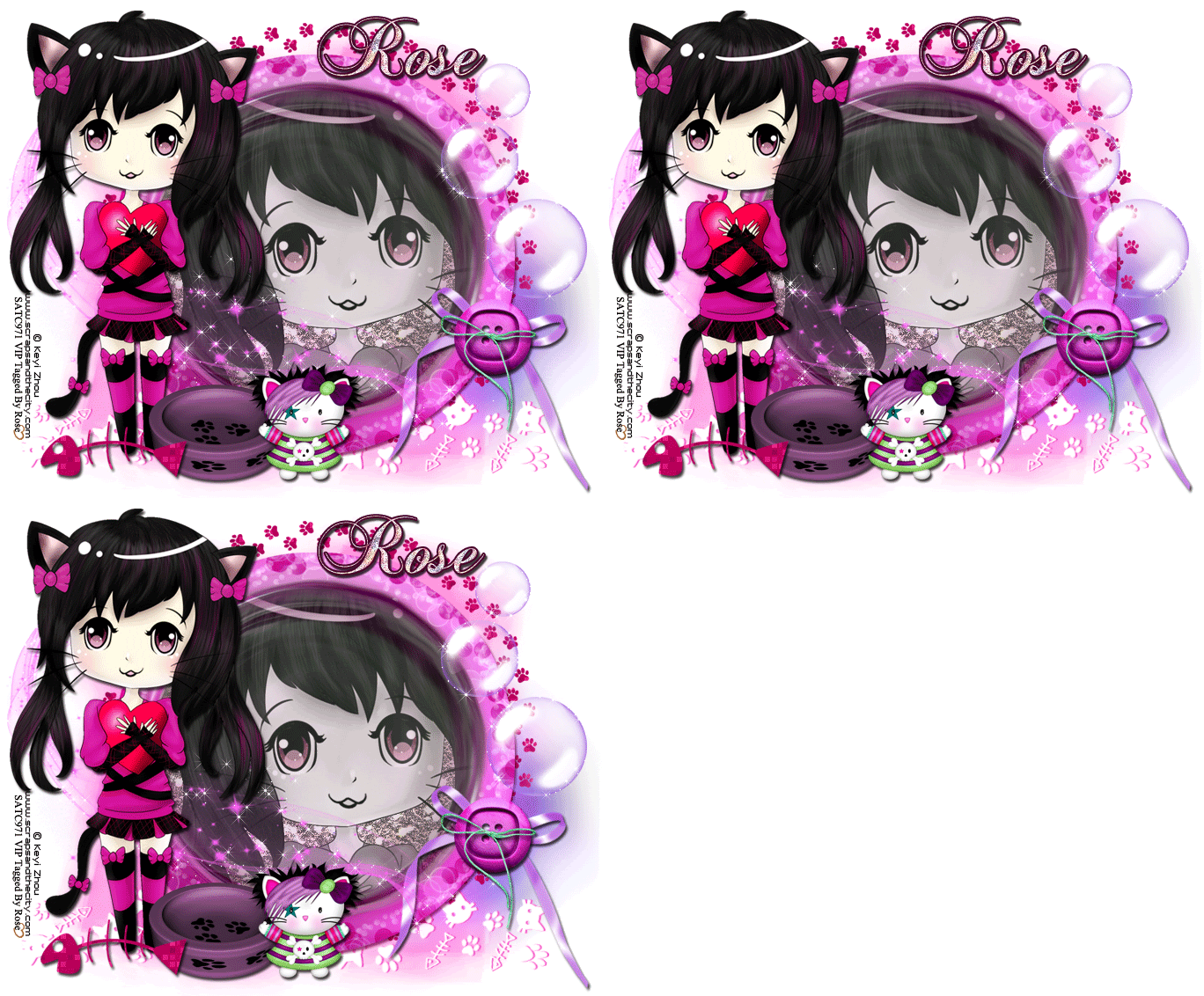
FTU Tutorial Animated Kitty
Tutorial written on 10th July 2012
This tutorial assumes you have working knowledge of
Adobe Photoshop CS2 and Adobe image Ready
This tutorial assumes you have working knowledge of
Adobe Photoshop CS2 and Adobe image Ready
♥ Supplies Needed ♥
♥ You Need SATC License number to use this Art
♥ Font and mask of Choice
♥ Plugin Needed Xenofex> Constellation
Open new document 700x600 pxl with white bg color
Open element 19 resize 80x80% paste it on center of the image
Open tube file and C/P tube on your image at left side of the frame Resize 60x60%
again copy tube layer and paste it on frame(elemet 19) behind the frame layer
cut the part of tube sticking out of the frame
Open Element # 4, 36 (resize 70x70), and 51 (resize 40x40%)
paste them on lower left part of the frame
Paste element 11 at lower part of frame behind frame and tube layer
Paste element 24 behind tube layer
Open Element 15, 21 (resize 50x50), 43 (flip Horizontal),
Paste Element 32 , make 2 dulpicate copies name 32-1, and 32-2
resize 32-1 70x70% , and 32-2 50x50%
arrange all of them on right side of frame as shown in image
now merg layer 32, 32-1, and 32-2
Open element 38 paste it behind frame layer little upper side
apply drop shadow to all your elements
now change color of element
Image> Adjustment> Hue/saturation
Element 4 , Hue = 180
Element 19, Hue = 124
Element 24, Hue= -148
Elelment 21 Hue= 111
For Glitter Animation
select layer (element 32) make 2 duplicate layers of it
now select each layer and apply Xenofex> Constellation
apply constellation all 3 layers
now select Layer (element 24) make 2 more duplicate layers
select all layers one by one and apply Xenofex> Constellation
move your image to Image Ready make 3 frames
set frame delay time 0.1 sec
now set visibility of glitter layers with each frame
click play to check animation
Open element 19 resize 80x80% paste it on center of the image
Open tube file and C/P tube on your image at left side of the frame Resize 60x60%
again copy tube layer and paste it on frame(elemet 19) behind the frame layer
cut the part of tube sticking out of the frame
Open Element # 4, 36 (resize 70x70), and 51 (resize 40x40%)
paste them on lower left part of the frame
Paste element 11 at lower part of frame behind frame and tube layer
Paste element 24 behind tube layer
Open Element 15, 21 (resize 50x50), 43 (flip Horizontal),
Paste Element 32 , make 2 dulpicate copies name 32-1, and 32-2
resize 32-1 70x70% , and 32-2 50x50%
arrange all of them on right side of frame as shown in image
now merg layer 32, 32-1, and 32-2
Open element 38 paste it behind frame layer little upper side
apply drop shadow to all your elements
now change color of element
Image> Adjustment> Hue/saturation
Element 4 , Hue = 180
Element 19, Hue = 124
Element 24, Hue= -148
Elelment 21 Hue= 111
For Glitter Animation
select layer (element 32) make 2 duplicate layers of it
now select each layer and apply Xenofex> Constellation
apply constellation all 3 layers
now select Layer (element 24) make 2 more duplicate layers
select all layers one by one and apply Xenofex> Constellation
move your image to Image Ready make 3 frames
set frame delay time 0.1 sec
now set visibility of glitter layers with each frame
click play to check animation
♥ Add copyright info and license number correctly
Add text, font of your choice add effects to your text stroke (color #630035) , drop shadow,
add pattern of your choice I used silver glitter patterns for text
Click Save Optimized as to save your animated gif image
Click Save Optimized as to save your animated gif image
I hope you enjoyed this Tutorial
Tuesday, 12 June 2012
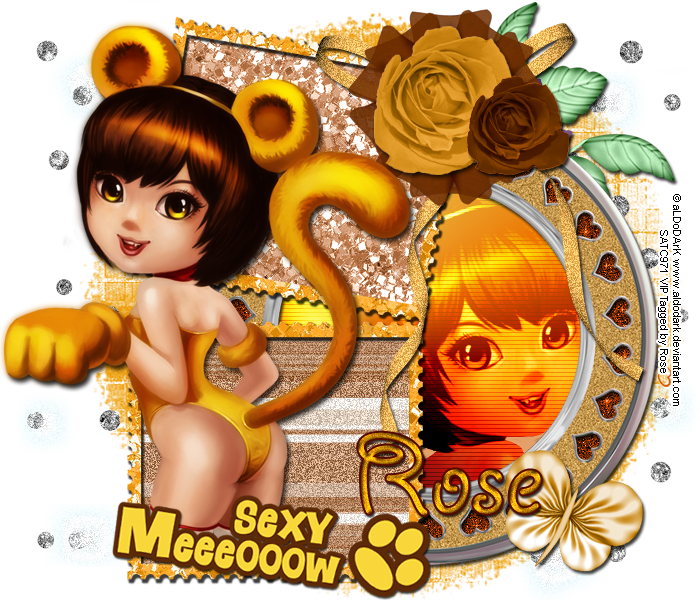
FTU Tutorial Sexy Meow
hue +109
saturation +58
now select your tube in round frame and again apply hue saturation
click on colorize and hue 27 saturation 69
open Filter> VanDerLee > interlace
horizontal scale 3
Horizontal thickness 1
Select Light
x position 44
y position 54
Angle 35
Focus 56
click ok :)
now slect element bow 10 and again click Filter > add noise 17%
and select bg paper4 and add noise 18%
Tutorial written on 11th June 2012
This tutorial assumes you have working knowledge of Adobe Photoshop CS2
♥ Supplies Needed ♥
♥ You Need SATC License number to use this Art
♥ Font of Choice I used GIDDYUP™
♥ Mask of choice i used 139 Insatiable Dreams mask
♥ Plugin Needed VanDerLee
Open new image (ctrl+n) 700 x 600 pxl with white bg color
open miz-stampframe2 Transform > Rotate >90 ccw and resize it 80 x 80
Open tube and place tube layer and resize it 65x 65 place it on the left side of the frame
place Title of the tube Sexy meeoow on the lower part of the tube resize it 60x60
open miz-frame and place it behind layer of frame2 resize it 60x 60
Open paper miz-pp4 and miz-pp6 cut papers according to frame 2
miz pp6 for upper part of the frame and mizpp4 for lower part of frame
open tube layer (new) and place it behind miz-frame layer
cut the tube part sticking out the frame
open new layer now select elliptical marquee tool (M)
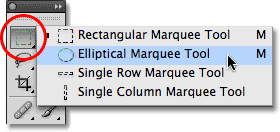
and select round frame as shown in picture
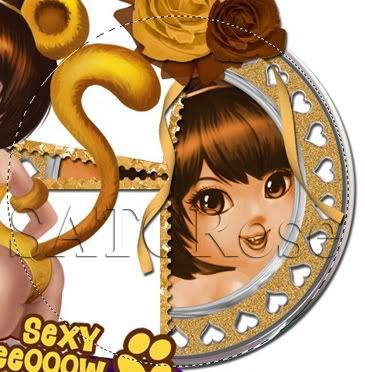
and fill it with white color double click on layer and add brown
glitter pattern of your choice,
Open element miz-bow10 (resize 50x50), place it on the right upper corner of the frame2
add miz-tulle5 (resize 35 x 35) and miz-rose3 (resize 50x50) place it on the bow10
open miz-rose1 (resize 30x30) place it on the right lower part of rose3
add miz-rose (resize 60x60) upper right side of the frame lyer behind all layers
add miz butterfly3(resize 35x35) rotate angle 21
now and miz-diamondrain behind all the layers
orignal kit is in purple color so i have changed color in 2 shades one is yellow
and other one is brown
for yellow color
Click Image> adjustments> Hue/saturation (ctrl+U)
hue +119
saturation +58
for brown color open new layer now select elliptical marquee tool (M)
and select round frame as shown in picture
and fill it with white color double click on layer and add brown
glitter pattern of your choice,
Open element miz-bow10 (resize 50x50), place it on the right upper corner of the frame2
add miz-tulle5 (resize 35 x 35) and miz-rose3 (resize 50x50) place it on the bow10
open miz-rose1 (resize 30x30) place it on the right lower part of rose3
add miz-rose (resize 60x60) upper right side of the frame lyer behind all layers
add miz butterfly3(resize 35x35) rotate angle 21
now and miz-diamondrain behind all the layers
orignal kit is in purple color so i have changed color in 2 shades one is yellow
and other one is brown
for yellow color
Click Image> adjustments> Hue/saturation (ctrl+U)
hue +119
saturation +58
hue +109
saturation +58
now select your tube in round frame and again apply hue saturation
click on colorize and hue 27 saturation 69
open Filter> VanDerLee > interlace
horizontal scale 3
Horizontal thickness 1
Select Light
x position 44
y position 54
Angle 35
Focus 56
click ok :)
now slect element bow 10 and again click Filter > add noise 17%
and select bg paper4 and add noise 18%
don't forget to add drop shadow your elements
♥ Add copyright info and license number correctly
now add text add effects stroke size 2 (color#540a01) , drop shadow,
pattern yellow glitter and add your mask color #ee9c00
pattern yellow glitter and add your mask color #ee9c00
now delete your white bg layer and save your image as PNG
I hope you enjoyed this Tutorial
Subscribe to:
Posts
(Atom)